

In Valorant, the globally acclaimed 5v5 tactical shooter from Riot Games, precise aim is the cornerstone of victory. And the foundation of precise aim? A comfortable and effective crosshair. When you see a teammate or a professional player with a crosshair that is both stylish and functional, don’t you wish you could have it instantly?
This guide will show you exactly how to copy a crosshair in Valorant—whether it’s from a pro, a friend, or that random Jett who keeps one-tapping you.
Part 1: How to Copy Someone’s Crosshair in Valorant
Part 2:How to Copy Crosshair in Valorant while Spectating
Part 3: How to Copy a Crosshair in Valorant Console
Part 4: The Best Valorant Crosshair Settings in 2025
Part 5: The Perfect Crosshair Deserves a Perfect Connection
How to Copy Someone’s Crosshair in Valorant
Some player want to know how to copy your friends or someone else crosshair in valorant, which is the most common and direct method. Valorant has implemented a convenient import feature, allowing you to apply a crosshair instantly as long as you have its unique code.
- Obtain the Crosshair Code: You can find crosshair codes from various sources. Look for them on your streamer’s channel, professional esports websites, player communities, or simply get one from a friend. The code is a long string of characters separated by semicolons, for example: 0;s;1;P;c;5;h;0;d;1;z;3;f;0;0t;1;0l;2;0o;2;0a;1;0f;0;1b;0.
- Head to Valorant Settings: Launch the game. From the main menu, click the gear icon in the top-right to access Settings.
- Go to the Crosshair Tab: Once in Settings, select the “Crosshair” tab at the top of the menu.
- Import Your Code: Find the downward arrow icon next to your crosshair profile. Click it and paste your code there.
- This is the “Import Profile Code” button. Click it.
- Paste and Go: A box will pop up. Paste your code in there, hit “Import,” and boom. Your new crosshair is live. It’s a good idea to rename the new profile so you don’t forget whose god-tier aim you just borrowed.
How to Copy Crosshair in Valorant while Spectating
When you’re dead in the game, spectating a teammate who’s clutching the round. Their crosshair is perfect. Do you need to wait until after the game and awkwardly ask them for the code? Nope. You can steal it right then and there.
While you’re watching them, just pop open the chat and type:
- /cc
- /crosshair copy
Then hit Enter. The game will quietly confirm that you’ve copied their settings and saved it as a new profile. After the match, you can head into your settings, find your freshly acquired crosshair, and take it for a spin. It’s that simple.
How to Copy a Crosshair in Valorant Console
If you’re coming from other tactical shooters like CS:GO, you might be asking yourself, “Where is the developer console? How can I copy a crosshair in Valorant console?”
It’s a good question. Valorant doesn’t have a traditional command-line console accessible to players.
However, Valorant has essentially baked the functionality of a console directly into the game’s user interface, creating a more visual and intuitive way to achieve the same results. However, think of the in-game settings menu as its modern equivalent. Here’s how you can achieve a command-line-like experience using it:
Method 1: Use Import Codes
Think of a crosshair import code as one single, super-powerful console command. This long string of text contains every single value for a crosshair—color, thickness, gap, outlines, and more—all bundled into one neat package.
Pasting the code into the import box instructs Valorant to apply all those settings at once. This lets you get the exact same complex setup instantly, skipping the need to enter dozens of commands manually.
Method 2: Use the Settings Menu
This is where you act as the console yourself, inputting values one by one. The crosshair settings menu is your command center for fine-tuning. Every slider, toggle, and input box is the equivalent of a single console command from another game.
- Adjusting the “Inner Line Thickness” slider to ‘2’? That’s Valorant’s visual way of letting you input a command like cl_crosshairthickness 2.
- Toggling the “Center Dot” to ON? That’s the same as typing cl_crosshairdot 1.
- Changing the color to Cyan? You’re just visually selecting the value instead of typing cl_crosshaircolor 5.
While you won’t type copy crosshair into a traditional console, this method gives you the same powerful control – delivered through a much more user-friendly interface. The console method in Valorant is all about using the tools the game gives you to manually replicate or build any crosshair you can imagine, parameter by parameter.
The Ideal Valorant Crosshair Setting in 2025
Need some inspiration? Here are a few battle-tested presets you can import right now.
- Asuna’s crosshair code: 0;P;o;1;0t;1;0l;2;0a;1;0f;0;1b;0
- Cryocells’ crosshair code: 0;P;h;0;0l;4;0o;0;0a;1;0f;0;1b;0
- Boostio’s crosshair code: 0;P;c;5;h;0;0l;5;0o;1;0a;1;0f;0;1t;0;1l;0;1o;0;1a;0;1m;0;1f;0
- Estrella’s crosshair code: 0;P;c;1;h;0;0l;3;0v;3;0g;1;0o;2;0a;1;0f;0;1b;0
- HYUNMIN’s crosshair code: 0;P;o;1;d;1;0b;0;1b;0
- freeing’s crosshair code: 0;p;0;P;c;1;o;1;d;1;0b;0;1b;0
- ZmjjKK’s crosshair code: 0;p;0;s;1;P;c;7;o;1;f;0;s;0;0t;1;0l;3;0o;2;0a;1;0f;0;1b;0;A;o;1;d;1;0b;0;1t;0;S;c;0;s;0.591;o;1 (shown above)
- Smoggy’s crosshair code: 0;s;1;P;c;2;o;1;d;1;f;0;0b;0;1b;0;S;c;0;o;1
- S1Mon’s crosshair code: 0;s;1;P;o;1;d;1;z;3;f;0;0t;6;0l;0;0a;1;0f;0;1b;0;S;c;6;s;0.949;o;1
- nobody’s crosshair code: 0;s;1;P;c;5;o;1;f;0;0b;0;1t;1;1o;3;1a;1;1m;0;1f;0;S;d;0
Leo’s crosshair code:
- 0;P;h;0;0l;3;0o;0;0a;1;0f;0;1b;0
Chronicle’s crosshair code:
- 0;P;c;7;o;1;f;0;0t;1;0l;3;0v;3;0g;1;0o;2;0a;1;0f;0;1b;0
- kaajak’s crosshair code: 0;s;1;P;o;1;d;1;f;0;0b;0;1b;0;S;t;000000FF;s;0.603;o;1
- Life’s crosshair code: 0;s;1;P;c;5;h;0;f;0;s;0;0l;4;0o;2;0a;1;0f;0;1b;0;S;s;0.86;o;1 (shown above)
- yosemite’s crosshair code: 0;s;1;P;u;000000FF;o;0.6;f;0;0t;1;0l;2;0v;0;0o;2;0a;1;0f;0;1b;0
Of course, there is no such thing as an outright best crosshair, as players will always have their preferences.
The Perfect Crosshair Deserves a Perfect Connection
So, you’ve got the crosshair. It’s beautiful. You load into a match, feeling faster, sharper. You peek at an angle, your dot perfectly placed on the enemy’s head… and your screen freezes for half a second. By the time it unfreezes, you’re reading your own death summary.
What good is a pixel-perfect crosshair if your game can’t keep up? There’s nothing more infuriating than losing a fight to lag, packet loss, or a sudden FPS drop. Your skill is being bottlenecked by your connection and your PC’s performance.
This is exactly the problem LagoFast was built to solve. It’s not just another game booster; it’s your personal technician for a flawless gaming experience.
Instead of just hoping for the best, LagoFast actively carves out a private highway for your game data, bypassing congested internet traffic to crush lag and stabilize your ping. But it goes further. With its one-click FPS Boost, LagoFast streamlines your PC, optimizing your CPU and GPU to squeeze out every last frame of performance. This means smoother tracking, faster reactions, and no more heart-sinking stutters during a crucial firefight.
What really sets LagoFast apart is its player-first approach. You pay by the minute, so you’re never wasting money on a subscription during weeks you’re too busy to play. It supports over a thousand games, and getting started is as simple as clicking a single button.
How to Getting Started with LagoFast Refreshingly Simple
Step 1: Download and install LagoFast.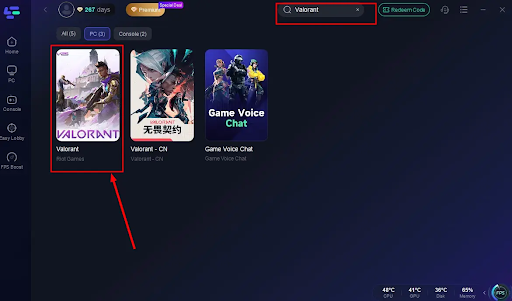
Step 2: Search Valorant in the Search Box and select it in the search result.
Step 3: Choose the server.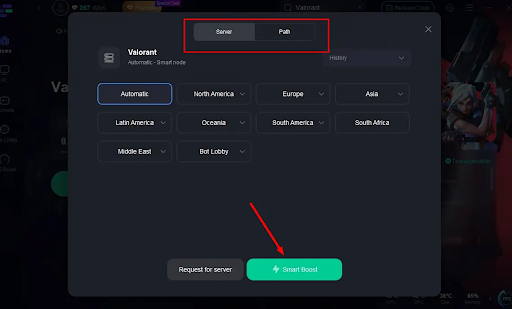
Step 4: Click on the Boost button and start boosting. Here, you can see your real-time ping & packet loss rate.
Conclusion
Stop letting your hardware and connection dictate your rank. You’ve already taken the first step by optimizing your crosshair.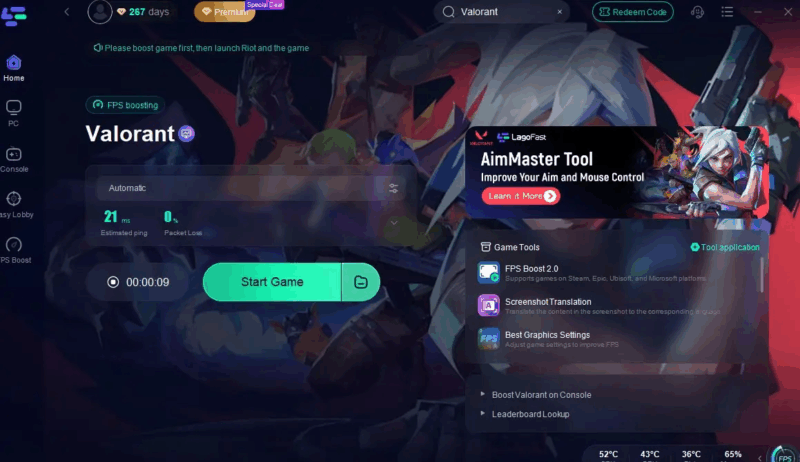
Now, complete the picture. Pair that perfect aim with flawless performance.
![[D2] Daily Reset Thread [2021-09-07]](https://meltingtopgames.com/wp-content/uploads/2023/07/Untitled-design-2024-07-10T102422.093-1160x651.png)